
Description
Zybroz AI Agents turns your WordPress dashboard into an AI automation platform. Instead of copy‑pasting prompts into ChatGPT, you build reusable AI agents that do real work on your site: writing meta descriptions, generating image alt text, auditing internal links, building FAQ schema, moderating comments, backing up your database, and more.
Each agent is a structured configuration with its own persona, scope, logic, safety rules and version history, so its behaviour is predictable and repeatable. Every change is previewed with a dry run and protected by an automatic backup and one‑click rollback before anything is written to your site.
It is built for site owners, bloggers, marketers, agencies, developers and small businesses who want practical AI automation for WordPress – not just another chat box.
Automate WordPress SEO Tasks
Draft SEO meta descriptions in bulk, audit your SEO plugin setup for conflicts, generate FAQ blocks for rich snippets, and flag stale content that needs refreshing.
Automate Content & Accessibility
Rewrite and improve posts, check readability, and generate structured content with clear guardrails against invented facts. Scan for images missing alt text and auto‑generate descriptive, SEO‑friendly tags.
Automate Site Maintenance & Links
Find orphan pages with no inbound links and audit internal links for broken targets. Report available plugin updates and site‑health issues, find unused or oversized media, and run full database and uploads backups.
Automate Comment Moderation
Review and act on comment queues with an automatic backup taken before any bulk action is applied.
Works with OpenAI GPT, Claude, Gemini and local AI models
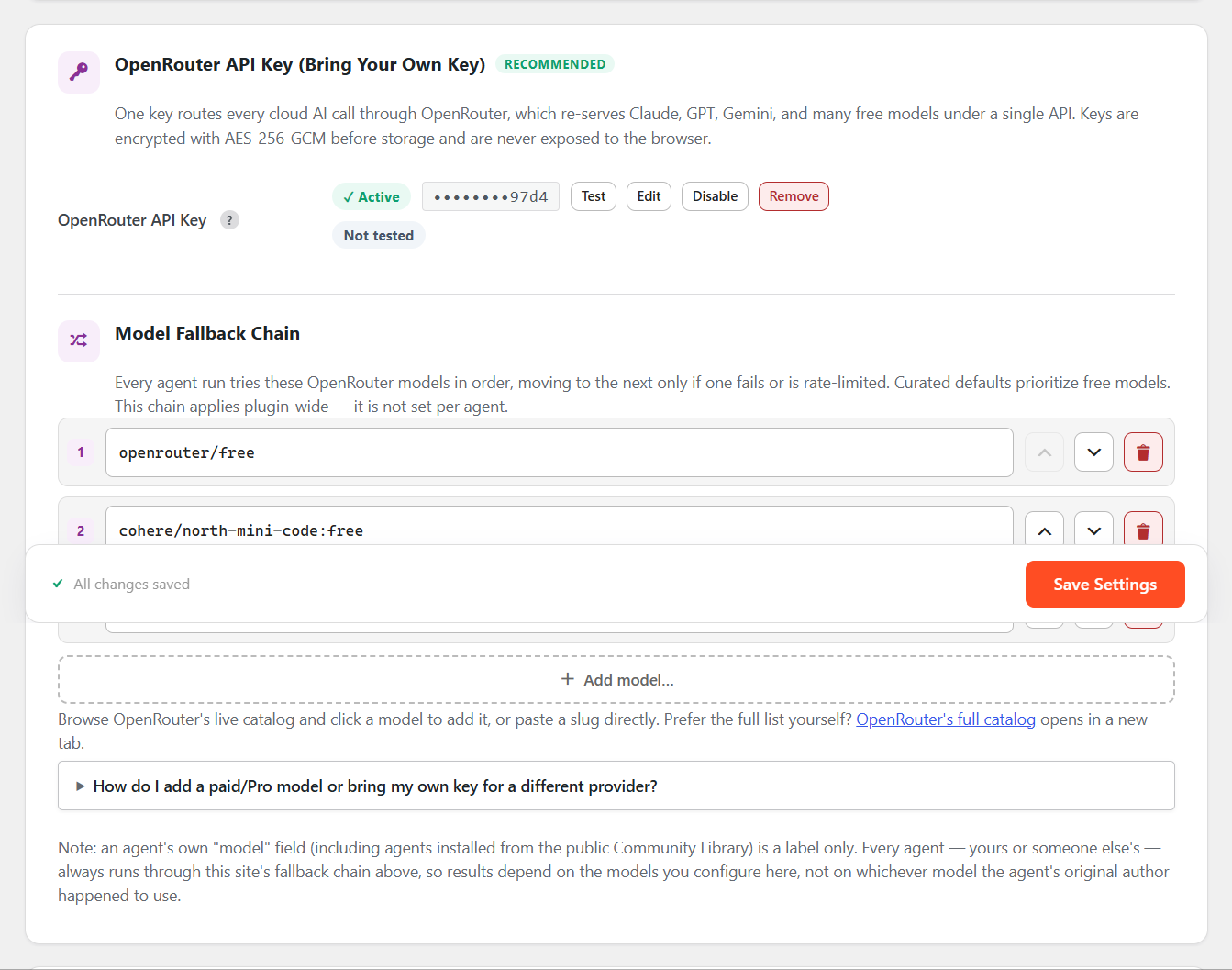
One OpenRouter API key routes every cloud AI call through a curated fallback chain, with free models prioritised so you can start at zero cost. Through OpenRouter you can reach Claude, GPT, Gemini and dozens of other models without adding a separate key for each. Prefer to keep everything on your own hardware? Point the plugin at a local Ollama server and no data leaves your network.
The logic‑only InbuiltEngine runs maintenance and admin agents with no API key at all.
Privacy first, no lock‑in
- No account required. No telemetry on activation or automatically, ever.
- Nothing is sent to any AI provider until you add your own key and run an agent.
- API keys are encrypted before storage and never exposed to the browser.
- Export any agent as JSON or a plain prompt template and reuse it on any site or in any external AI tool.
Why choose Zybroz AI Agents?
- Safety by default – dry‑run preview, automatic post snapshots, and one‑click rollback before every write operation.
- You stay in control – agents move through draft, active and failed states; write agents always show you exactly what they found before asking for approval.
- Genuinely free – all core features are fully functional with no usage caps, quotas or hidden paywalls.
- Repeatable, not random – structured agent JSON with versioning means the same agent behaves the same way every time.
Who is it for?
Bloggers automating on‑page SEO, agencies standardising site audits across many clients, developers who want scriptable AI actions with a REST surface, and store owners who need bulk content and maintenance tasks handled safely.
Key Features
- Visual Agent Builder – two‑column builder with tabbed panels for Persona, Scope, Logic and Safety, plus a live JSON preview. Save and qualify is gated behind a successful dry run.
- AI Prompt Generator – describe what you want in plain English and let AI write a structured system prompt; compare, accept, keep or regenerate.
- Chat‑to‑Create Wizard – a guided flow that suggests an agent name, role, goal, system prompt and category, creates a draft, and runs a dry run for you.
- Agent Versioning – automatic patch bumps on save, stable and major release actions, plus full version history and restore.
- Export / Import – export agents as JSON or as a prompt‑template text file for external AI tools; import either format back into the builder.
- Multi‑model AI – one OpenRouter key routes every cloud call through a curated fallback chain (free models first), plus local Ollama support.
- BYOK security – API keys are encrypted before storage and never exposed to the browser.
- InbuiltEngine – logic‑only AI Actions that run with no API key for maintenance and admin tasks.
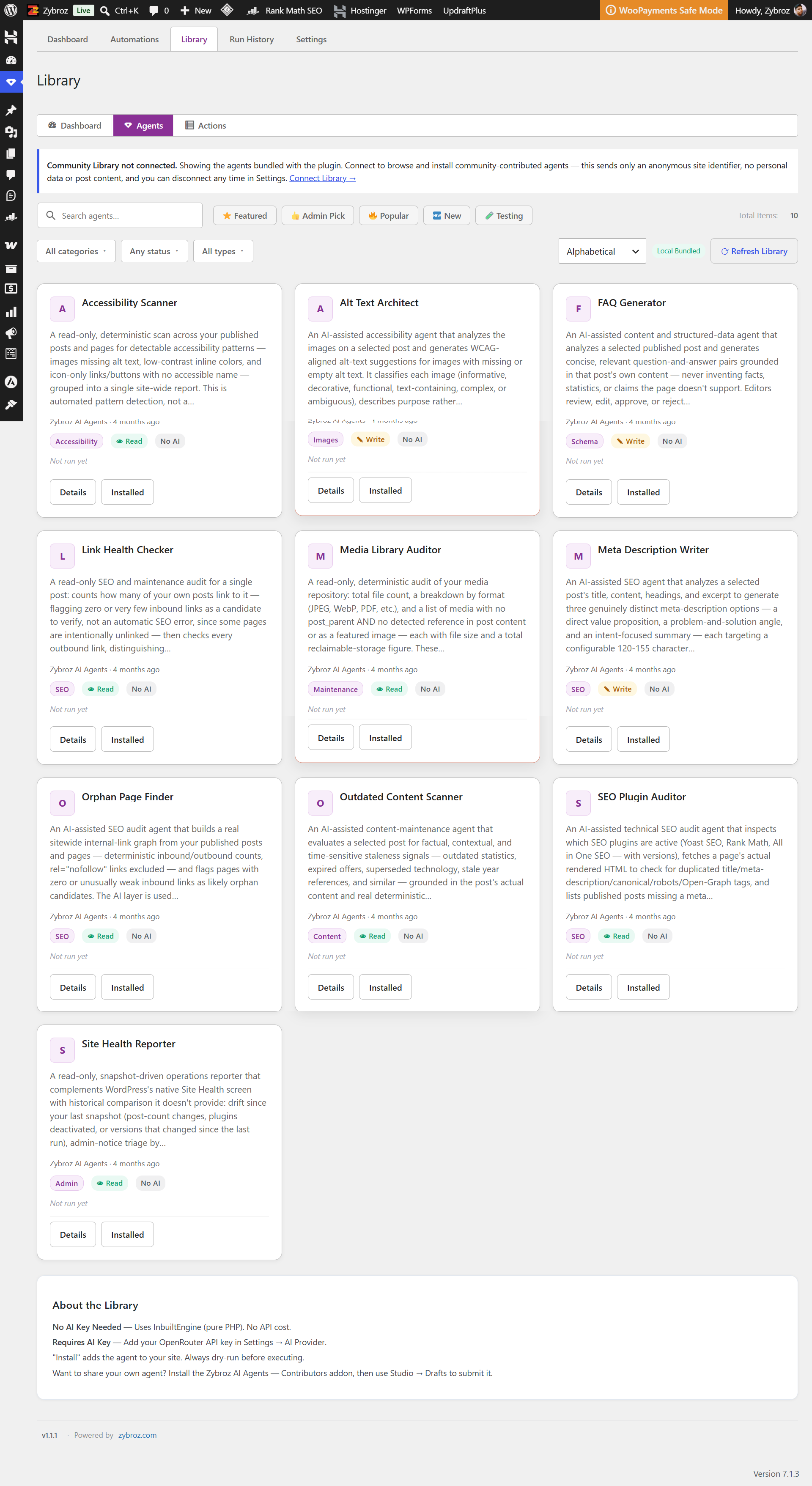
- Agent Library – ready‑to‑use starter agents across content, SEO, images, schema, social, comments and admin health.
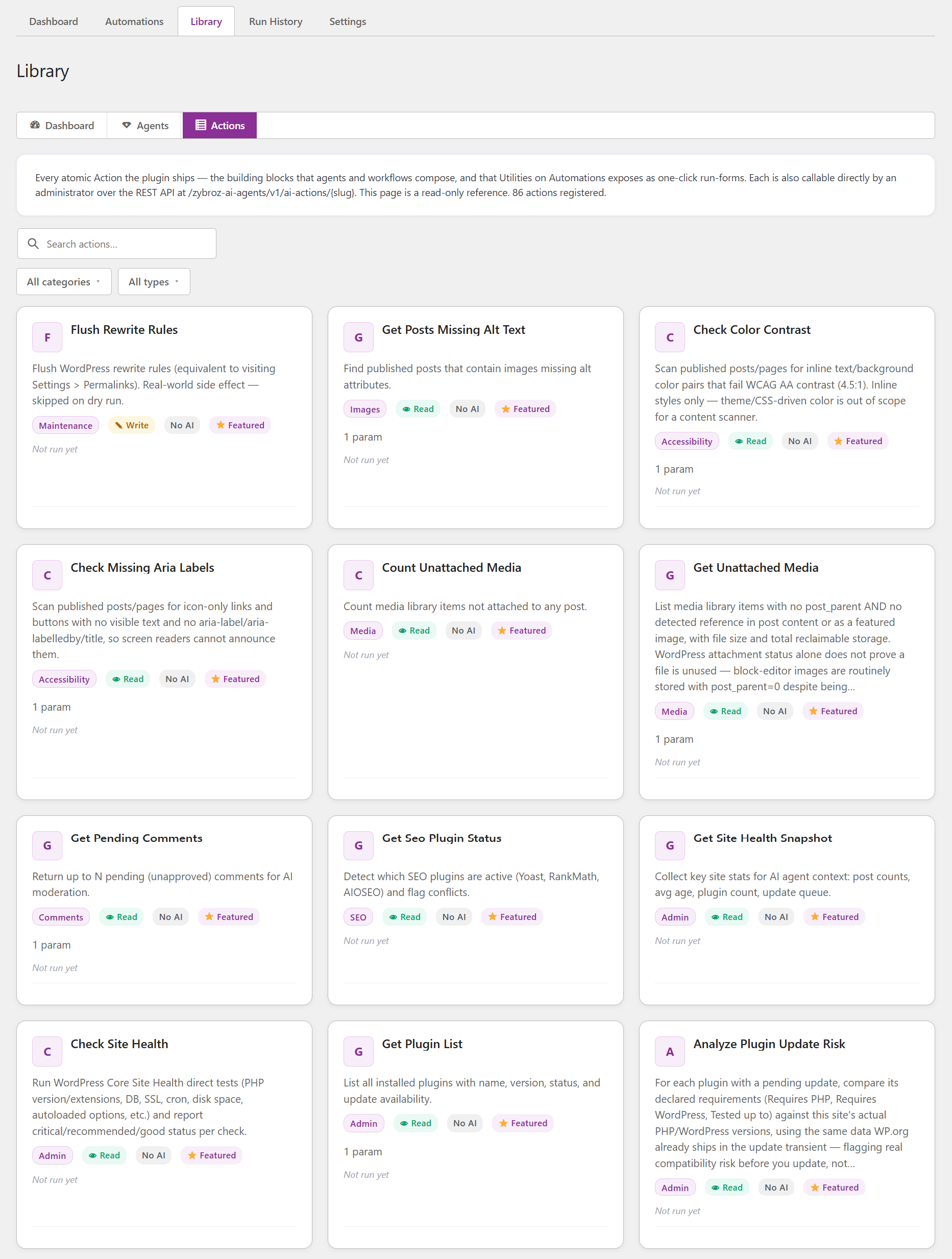
- AI Action Library – vetted atomic operations for real WordPress changes, including read and write actions.
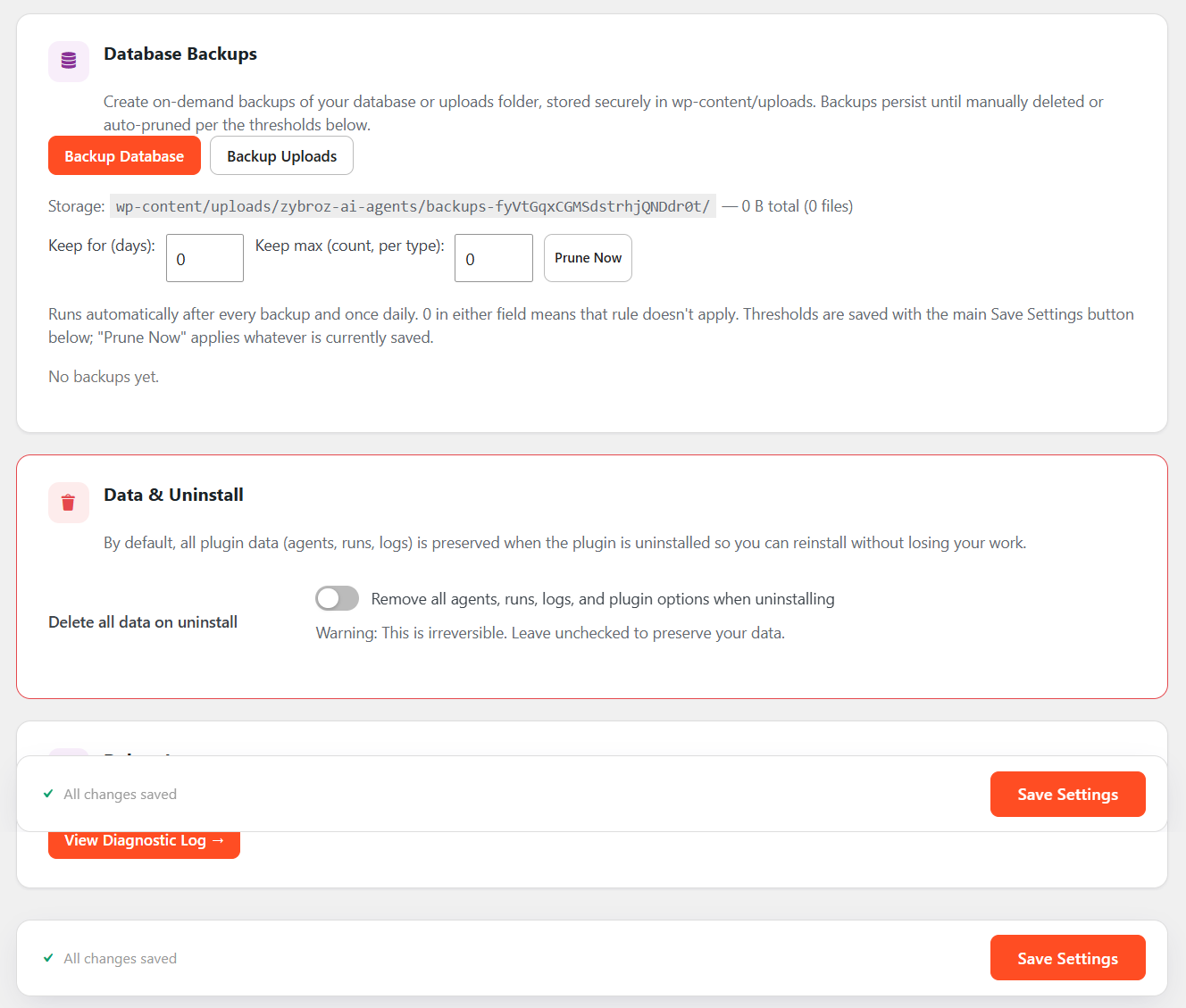
- Advanced Backup Module – full database and uploads backups with list, delete and restore, stored in a protected per‑site folder.
- Quality Precheck – validates agent JSON before qualification and highlights missing fields, scope issues or missing provider settings.
- Safety Layer – automatic post snapshots, dry‑run preview mode, one‑click rollback, and a consent gate on write-capable steps that halts and requires your approval in every run mode before anything is written.
- Workflows – chain agents, actions and conditions into multi‑step automations with a visual builder and run history.
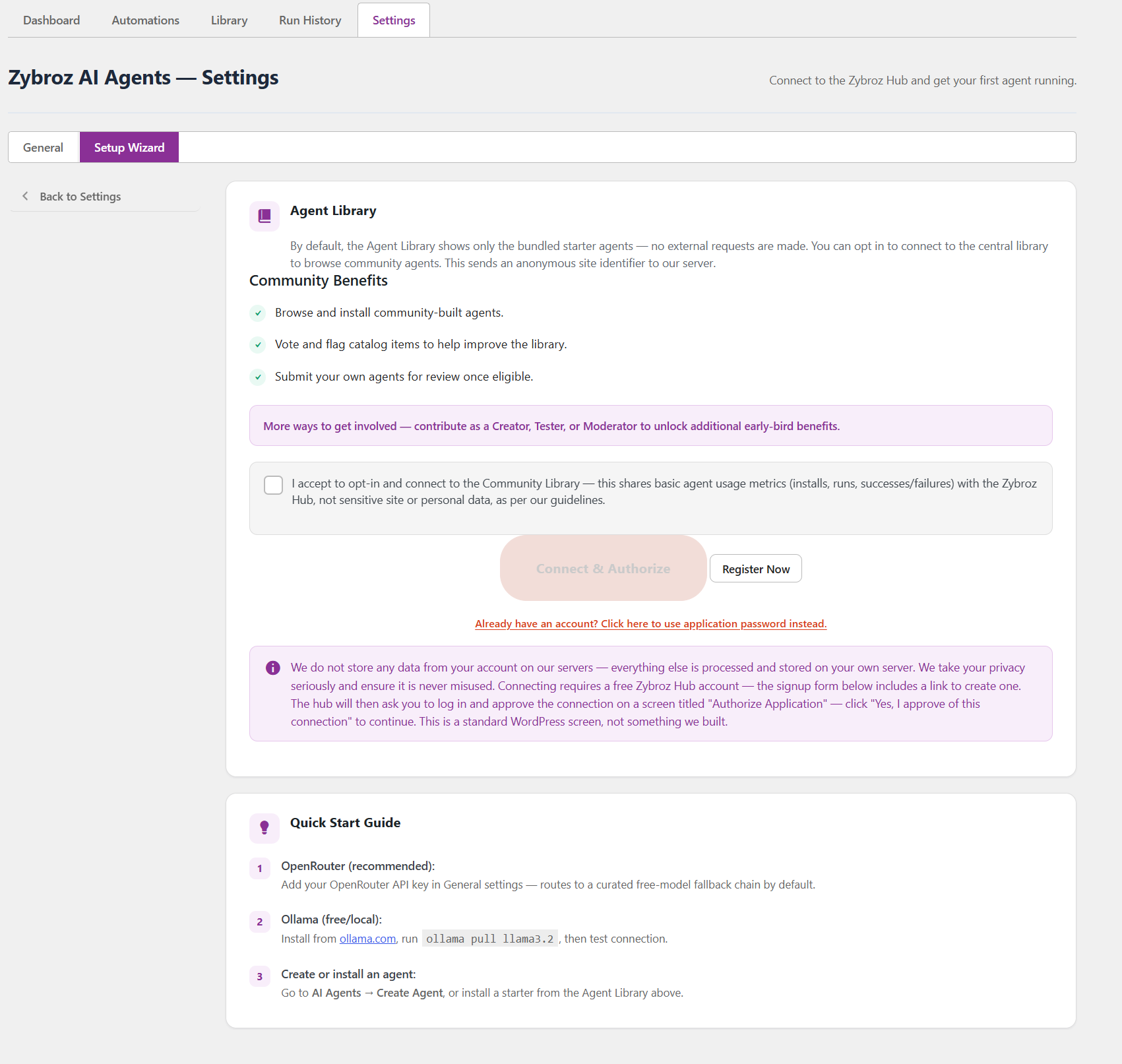
- Community Library – browse, install, and optionally publish agents to/from the Zybroz Hub, with ratings, favorites, and update notifications for Hub‑sourced items.
- More AI Providers – optionally configure a direct key for Anthropic, OpenAI, Google, or WordPress’s own Core AI Client, as an alternative to OpenRouter.
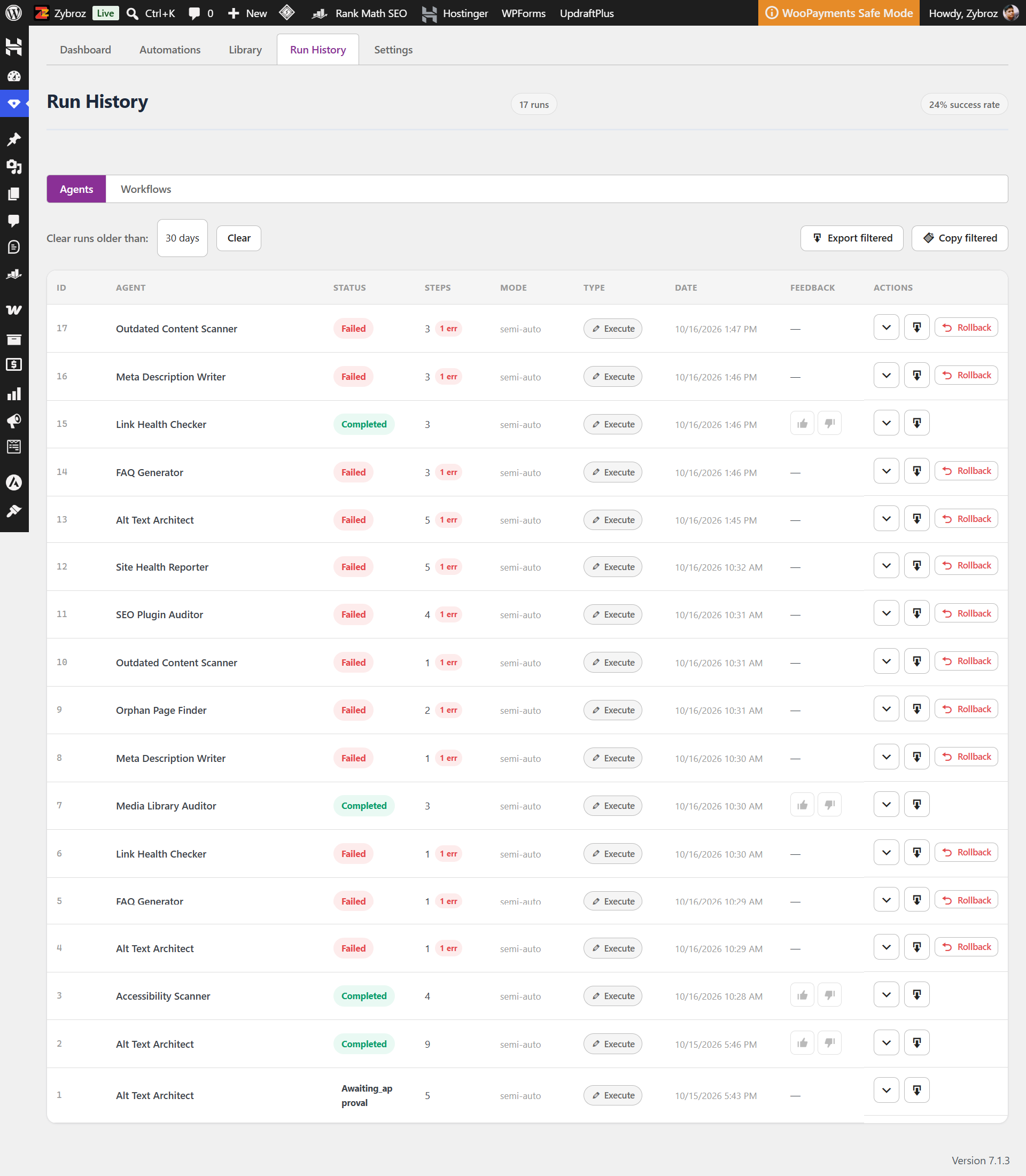
- Run History & Metrics – track total runs, success rate and favourites for each installed agent.
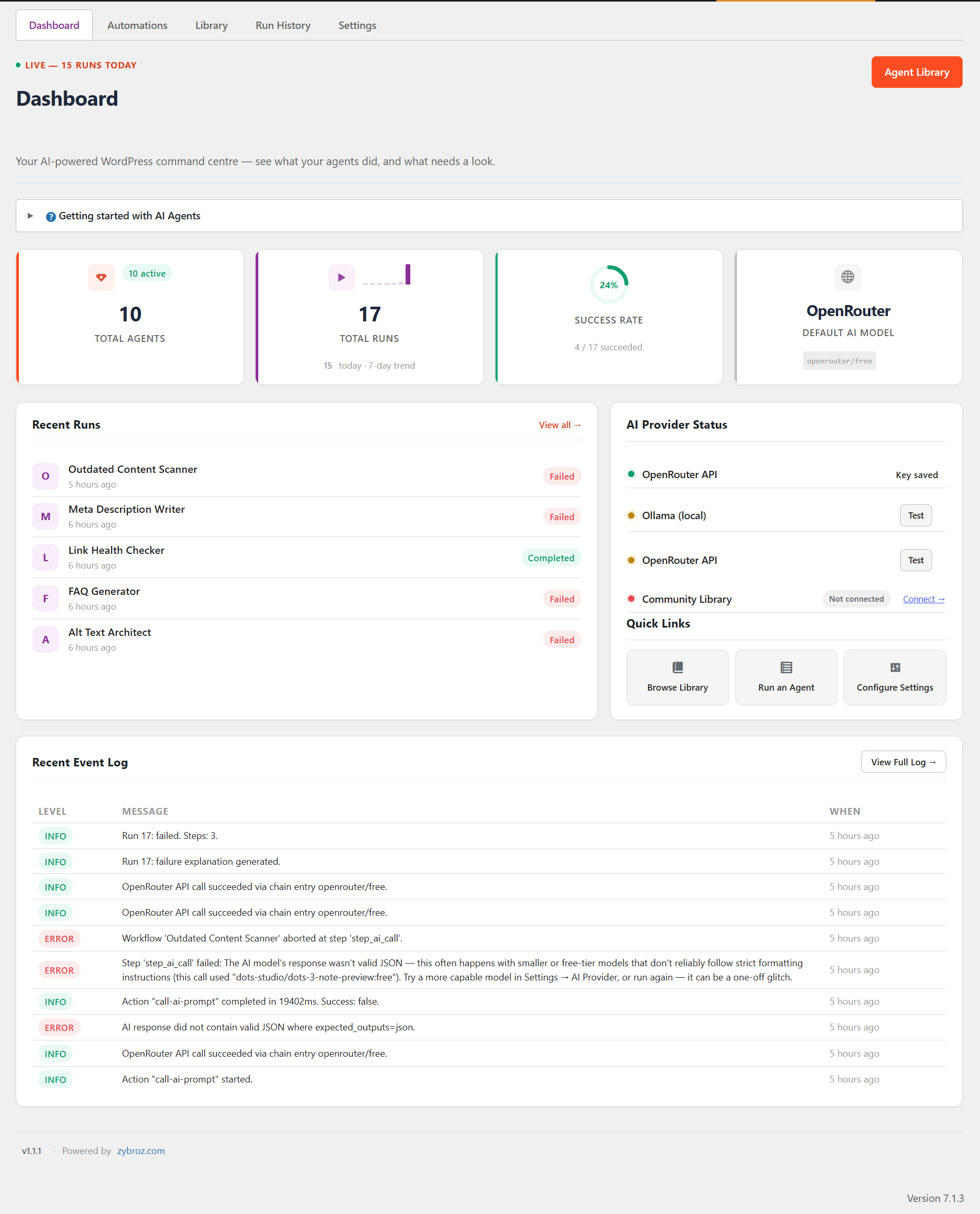
- Dashboard – site health, recent runs, provider connection status and quick actions in one place.
- WooCommerce Product Copy – read full product grounding context (name, SKU, price, stock, categories, attributes, images/alt text) and update a product’s full and short description without touching price, stock, variations or tax/shipping settings.
- Achievements & Share Cards – run-count and streak milestones unlock automatically, and any run or milestone can be turned into a branded, AI-captioned share-card image from the Runner.
Starter Agents
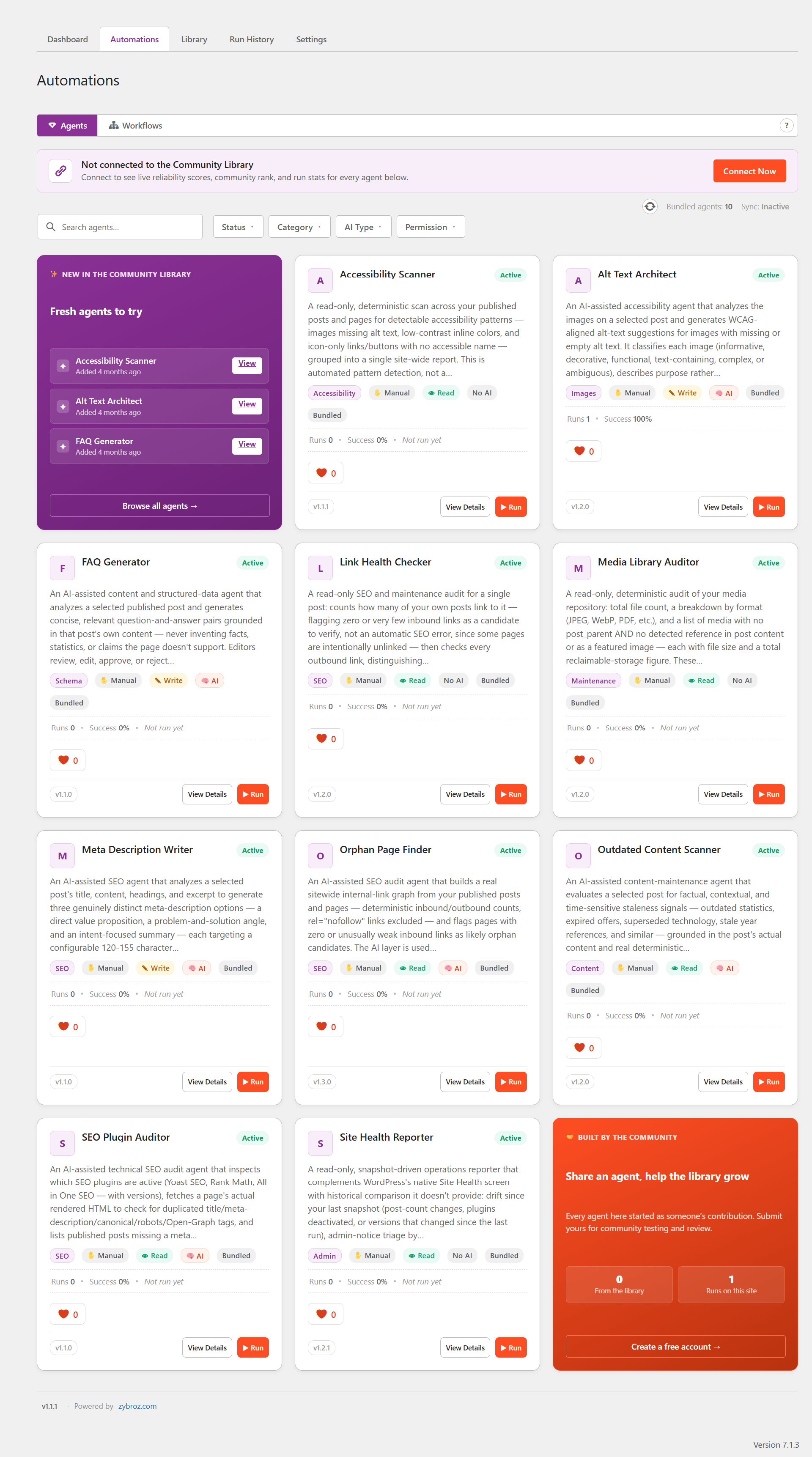
Ten simple, low‑risk agents are installed and ready to run the moment you activate the plugin:
- Accessibility Scanner – finds published content with images missing alt text.
- Alt Text Architect – generates descriptive alt text for images missing descriptions.
- Meta Description Writer – drafts SEO meta descriptions for a post.
- FAQ Generator – builds FAQ pairs from a post for rich‑snippet eligibility.
- Link Health Checker – audits internal links for broken targets.
- Media Library Auditor – reports unused and oversized media.
- Site Health Reporter – reports which plugins have updates available and summarises site health.
- SEO Plugin Auditor – checks your SEO plugin setup for conflicts and gaps.
- Orphan Page Finder – lists published pages with no internal links pointing to them.
- Outdated Content Scanner – flags stale posts that may need refreshing.
This bundled set replaces the five starter agents shipped in 0.9.391 (Traffic Healer, Alt Text Architect, Internal Link Weaver, Schema Guardian, Social Sniper). If you installed any of those on 0.9.391, they are not removed from your site on upgrade — only the newer bundle above is pre‑installed for new activations. Traffic Healer, Internal Link Weaver, Schema Guardian and Social Sniper remain available to install from the Community Library.
More advanced agents – multi‑step rewriters, an autonomous site orchestrator, taxonomy and schema tools, comment moderation and more – are available in the Community Library under the “Testing” filter. Install one to try it and help review it.
Requirements
- PHP 8.1 or higher.
- WordPress 6.4 or higher.
- An OpenRouter API key for cloud AI models, or Ollama running locally. Neither is required for logic‑only (InbuiltEngine) agents.
Bundled Libraries
- Action Scheduler 4.0.0 (GPLv3) — used for the plugin’s background job queue (backups, scheduled scans). Because Action Scheduler is licensed GPLv3, the combined work is distributed under GPLv3 terms; see License above.
Privacy
- No data is sent to third parties unless you configure an external API key, or unless you explicitly connect a Zybroz Hub account under Agent Library -> Contribute.
- Depending on which AI Agents and AI Actions you run, the content sent to your configured AI provider can include WordPress content such as post titles/body, and – for comment‑moderation agents – commenter names and comment text. See “External Services” below for exactly what is sent and when.
- API keys and Hub credentials are stored encrypted.
- Ollama runs locally with no external calls.
- No telemetry is sent on activation, and none is sent at all unless you explicitly connect a Zybroz Hub account under Agent Library -> Contribute. Once connected, the plugin sends: basic site info (once, to link your site to your account); the actions you explicitly take (voting, favoriting, submitting an agent, etc.); a daily automatic sync of per-agent run metrics (success/failure counts, no post content); and, after each agent run completes, an automatic report of that run’s outcome (success/failure only, no post content). A random anonymous install identifier (no personal data) is generated and sent alongside these so the Hub can associate them with your connected account. See “External Services” below for exactly what is sent and when.
External Services
This plugin can optionally connect to external AI services to run agents: OpenRouter (a unified API that re‑serves Claude, GPT, Gemini and other models) by default, or — if you choose to configure one in Settings -> More AI Providers — a direct connection to Anthropic, OpenAI, or Google using your own key for that provider. It can also talk to Ollama, which you run yourself, and to whatever provider you’ve separately registered through WordPress’s own Core AI Client. All connections are user‑initiated and require you to supply your own API key for the provider you choose. No data is sent to any provider without a key being configured and an agent run being triggered.
The exact content sent depends on which agent or AI Action you run. This always includes the agent’s configured system prompt. Depending on the agent’s scope, it can also include WordPress content relevant to that agent’s task – for example, a post’s title and body for a content‑rewriting agent, or a commenter’s name and comment text for a comment‑moderation agent. The plugin does not send WordPress credentials, API keys, or payment information to any AI provider. If your site handles content containing personal data (e.g. names in comments or post content), that data may be included in the request when an agent processing that content is run – review each agent’s scope before running it on content containing personal data.
OpenRouter API (New default path since 0.9.392)
- What it does: Routes your configured agent prompts to one of several underlying AI models (selected automatically from a fallback chain you configure in Settings) and returns AI‑generated text responses for WordPress automation tasks.
- Data sent: The system prompt, plus whatever WordPress content the agent’s scope includes (e.g. post title/content, or commenter name/comment text for comment‑moderation agents). No WordPress credentials are sent.
- When: Only when an agent run is triggered, or when you click “Test Connection” on the Settings page (checks key validity only – no WordPress content sent).
- Provider: OpenRouter, Inc.
- Terms of Service: https://openrouter.ai/terms
- Privacy Policy: https://openrouter.ai/privacy
Direct provider connections (optional, opt-in under Settings -> More AI Providers)
0.9.391 and earlier connected directly to Anthropic/OpenAI/Google as the only path, with no OpenRouter option. 0.9.392 retires those original key fields (see the Migration note in the 0.9.392 changelog entry) and makes OpenRouter the new default — but if you’d rather not route through OpenRouter, a newly-added “More AI Providers” panel (New in 0.9.392) lets you configure a fresh direct key for any of the providers below instead. Only the provider(s) you configure a key for are ever contacted; the plugin does not share your key or your content with any provider you haven’t configured.
- Anthropic PBC (Claude models) – What it does: runs your configured agent prompts directly against Anthropic’s API when a direct Anthropic key is configured and selected. Data sent: the same system prompt + WordPress content the agent’s scope includes, as described above. No WordPress credentials sent. When: only when an agent run is triggered using this provider, or when you click “Test Connection” for it. Terms: https://www.anthropic.com/legal/consumer-terms – Privacy: https://www.anthropic.com/legal/privacy
- OpenAI, LLC (GPT models) – Same data/when terms as above, using your configured OpenAI key. Terms: https://openai.com/policies/terms-of-use – Privacy: https://openai.com/policies/privacy-policy
- Google LLC (Gemini models) – Same data/when terms as above, using your configured Google key. Terms: https://ai.google.dev/gemini-api/terms – Privacy: https://policies.google.com/privacy
- WordPress Core AI Client (Beta, WP 7.0+) – Delegates to whichever AI provider you’ve separately registered under Settings -> Connectors in WordPress core; this plugin never sees that provider’s key, only the response. Review the terms of whichever provider you’ve registered there.
If you also place one of these providers’ model slugs in your OpenRouter fallback chain instead of configuring a direct key for it, OpenRouter forwards that request to the provider on its own infrastructure, and that provider’s terms apply to the forwarded traffic — the same disclosures above apply in that case too.
Ollama (Optional, local only)
- What it does: Runs an AI model on a server you control and returns generated text.
- Data sent: The same prompt/content an agent’s scope includes – sent only to the Ollama host URL you configure (by default http://localhost:11434, i.e. your own machine).
- When: Only when an agent run is triggered with Ollama selected as the provider, or when you click “Test Connection” for Ollama in Settings.
- Provider: none – this is self‑hosted software, not a third‑party service. No data leaves your network unless you point it at a remote host yourself.
- Project: https://ollama.com
Zybroz Hub / AI Agents Central Library (Optional — account-linked actions below are New in 0.9.392; catalog browsing existed in 0.9.391)
- What it does: Fetches a catalog of community‑contributed starter agents from the central registry so you can browse and install them from Agent Library. Browsing the catalog is read‑only and does not require an account.
- Data sent (browsing, no account connected): None beyond the request itself. Read‑only GET requests to the registry endpoint to retrieve the public agent catalog.
- Data sent (only if you explicitly connect a Zybroz Hub account under Agent Library -> Contribute): your site URL, site name, WordPress version, and PHP version (sent once, to link your site to your Hub account); a random anonymous install identifier generated locally (no personal data); the content of any action you explicitly take – casting a vote, favoriting an item, submitting a change request, or submitting an agent to the library; a daily automatic sync of per-agent run metrics (success/failure counts only, no post content); and an automatic report of each agent run’s outcome (success/failure only, no post content) sent right after that run completes. No data of any kind is sent unless you have connected an account – the daily …
Screenshots
Installation
- Upload the
zybroz-ai-agentsfolder to/wp-content/plugins/, or install it from Plugins -> Add New in your dashboard. - Activate the plugin through the WordPress Plugins menu.
- Go to AI Agents -> Settings and add your OpenRouter API key or configure Ollama. (Skip this to run logic‑only agents.)
- Go to AI Agents -> Agent Library and install a starter agent.
- Click Run on the agent to test it on a post with a safe dry run.
FAQ
-
Can Zybroz automate WordPress admin tasks?
-
Yes. Zybroz AI Agents allows you to automate repetitive WordPress admin tasks—like checking site health, identifying orphaned pages, finding oversized media, and running backups—using the logic-only InbuiltEngine or your preferred AI provider.
-
Can I create reusable AI workflows for WordPress?
-
Yes. You can build multi-step AI workflows using the Visual Agent Builder. Because agents are saved as structured JSON, your workflows are completely reusable, version-controlled, and can be exported to other WordPress sites.
-
Is this plugin free?
-
Yes. Every core feature – the Visual Agent Builder, all starter agents, the AI Action Library, backups, dry run and rollback – is fully functional with no usage limits or paywalls. You only pay your chosen AI provider (OpenRouter) for the model calls you make, and OpenRouter offers free models.
-
Do I need an OpenRouter or OpenAI API key?
-
No. You can run logic‑only agents with the InbuiltEngine and no key at all, or use a local Ollama server. Cloud models (Claude, GPT, Gemini and others) are accessed through OpenRouter and need a valid OpenRouter key.
-
Which AI models are supported?
-
Any model available through OpenRouter, including Anthropic Claude, OpenAI GPT, Google Gemini, and many open‑source models – plus any model you run locally with Ollama. You configure a fallback chain so runs continue if one model is unavailable.
-
Will the plugin change my content automatically?
-
Only when you tell it to. Write agents run a dry run first, show you exactly what they found, take an automatic backup, and ask for your approval before writing. Every write can be rolled back with one click.
-
Is my content sent to OpenAI or Anthropic?
-
Only if you choose to use them, and only when you run an agent. By default, requests go through OpenRouter, which forwards to whichever model you picked in your fallback chain. If you instead configure a direct Anthropic, OpenAI, or Google key under Settings -> More AI Providers, the plugin contacts that provider directly. Either way, nothing is sent without a key configured for the provider you’re using.
-
Does it work with WooCommerce and other SEO plugins?
-
Yes. Agents operate on standard WordPress content and settings, and the SEO Plugin Auditor checks popular SEO plugin configurations for conflicts and gaps. For WooCommerce specifically, agents can read a product’s full data (price, stock, SKU, attributes, images) for grounding and update its full/short description without touching price, stock, variations or tax/shipping.
-
Can I use it on multiple sites?
-
Yes. Agent JSON can be exported and imported on any site running the plugin, so you can standardise the same automations across every site you manage.
-
Does installing an agent from the Community Library download or run any code?
-
No. An agent is plain JSON data – a name, a description, and an ordered list of steps that each reference one of this plugin’s own, already-installed AI Actions. Installing one never downloads, includes, or executes any PHP, JavaScript, or other code from the Hub.
-
What does “dry run” mean?
-
A dry run previews the agent output without writing any changes, so you can review the result before applying it.
-
What is the agent status machine?
-
Agents begin as draft, move to active after a successful first run, and move to failed if the first run fails. Failed agents must be edited before they can run again.
-
What is the InbuiltEngine?
-
A logic‑only engine for AI Actions that run in pure PHP with no API key – useful for maintenance and admin tasks that do not need a model call.
-
What is the Advanced Backup Module?
-
It creates database and uploads backups, stores them in a protected per‑site folder, and supports list, delete and restore.
Reviews
There are no reviews for this plugin.
Contributors & Developers
“Zybroz AI Agents – AI Automation” is open source software. The following people have contributed to this plugin.
Contributors
Translate “Zybroz AI Agents – AI Automation” into your language.
Interested in development?
Browse the code, check out the SVN repository, or subscribe to the development log by RSS.
Changelog
1.2.0
Major update consolidating all development since 1.1.2 into one WordPress.org release.
Runner Console findings-table report format, Accessibility Scanner / SEO Plugin Auditor / Ollama-default reliability fixes, Database Backups restore hardening, and a wide batch of Runner Console retest fixes.
- Added: run reports now render a standardized findings table (Finding / To Do / Source, plus an AI Suggestion column for agents that write changes) instead of a flat bullet list, for every bundled agent — not just a hand-picked few.
- Added: the final report now shows an aggregate “N issues found” summary line instead of only echoing whichever single step happened to finish last, so a multi-check agent’s earlier results are no longer silently dropped from the summary; reports with findings also get a visual accent so a clean run and a run with issues no longer look identical at a glance.
- Added: Accessibility Scanner’s “Fix with Alt Text Architect” hand-off (previously Classic Runner only) is now available in the Runner Console, and runs directly against the posts already found — no re-selecting a target.
- Added: an agent with a review/approval step can only ever run on one post at a time (a server-side rule that already existed); the Console’s “Run on multiple” option is now disabled with an explanatory tooltip for these agents instead of offering a bulk run that was guaranteed to fail.
- Added: the “this agent has had a failed run before” confirmation can now be auto-confirmed per agent via an opt-in checkbox, collapsing to a persistent one-line reminder on later runs instead of a full dialog every time.
- Added: Database Backups’ storage summary now breaks the total file count down by type — e.g. “(4 DB, 3 Uploads)” — since “Keep max (count)” prunes each type independently and a flat total could read as overdue for pruning when neither type actually was.
- Added: the run-report bubble now shows total run duration, a dedicated “Copy this report” button (separate from “Copy transcript”), and a “View Diagnostic Log” link; a failed step in the transcript now renders with a distinct error glyph and color instead of looking identical to a successful one.
- Added: when a run fails with a recognizable auth/credential error (e.g. “Missing Authentication header”, “Invalid API key”), a “Fix it” button now appears right on that line and opens Settings scrolled to the relevant provider card in a new tab; detection now also covers “User not found”, “No auth credentials found”, “Incorrect API key”, and “Authentication failed”.
- Added: the Run button, and the “Run on multiple” scope/Run button when nothing matches, now show a tooltip explaining why they’re disabled; the bulk-scope item count shows “Counting…” while it loads; Escape closes the target-search dropdown and the “Run on multiple” scope popup; command-bar controls locked during an active run now show a tooltip explaining why.
- Fixed: Accessibility Scanner (and any other agent using the shared missing-alt-text scan) could report an image’s alt text as missing regardless of what was actually saved — a Media Library field that most authors never fill in (most set alt text through the block editor instead) was silently overriding the real, current value, and could also miss edits made directly on the attachment after the post was last saved. Editing or clearing alt text now correctly changes the scan result either way.
- Fixed: SEO Plugin Auditor’s “posts missing a meta description” table could show blank “(untitled)” rows with dead links — the underlying data was a reliable database query, but routing it back through the AI model for display risked exactly this kind of corruption; it no longer does.
- Fixed: setting Ollama as the Default AI Provider didn’t actually make agents run on it — most bundled agents request a tier-resolved cloud model by default, which Ollama routing didn’t recognize, so every run failed with “needs an AI provider that isn’t configured” even with Ollama running. Ollama-only setups also no longer see a misleading “no usable AI provider” banner.
- Fixed: a database restore could shift where the plugin looks for its own backup files, making backups taken after that snapshot disappear from the Database Backups list; typing “RESTORE” to confirm a restore also wrongly armed the Settings page’s “Unsaved changes” save bar.
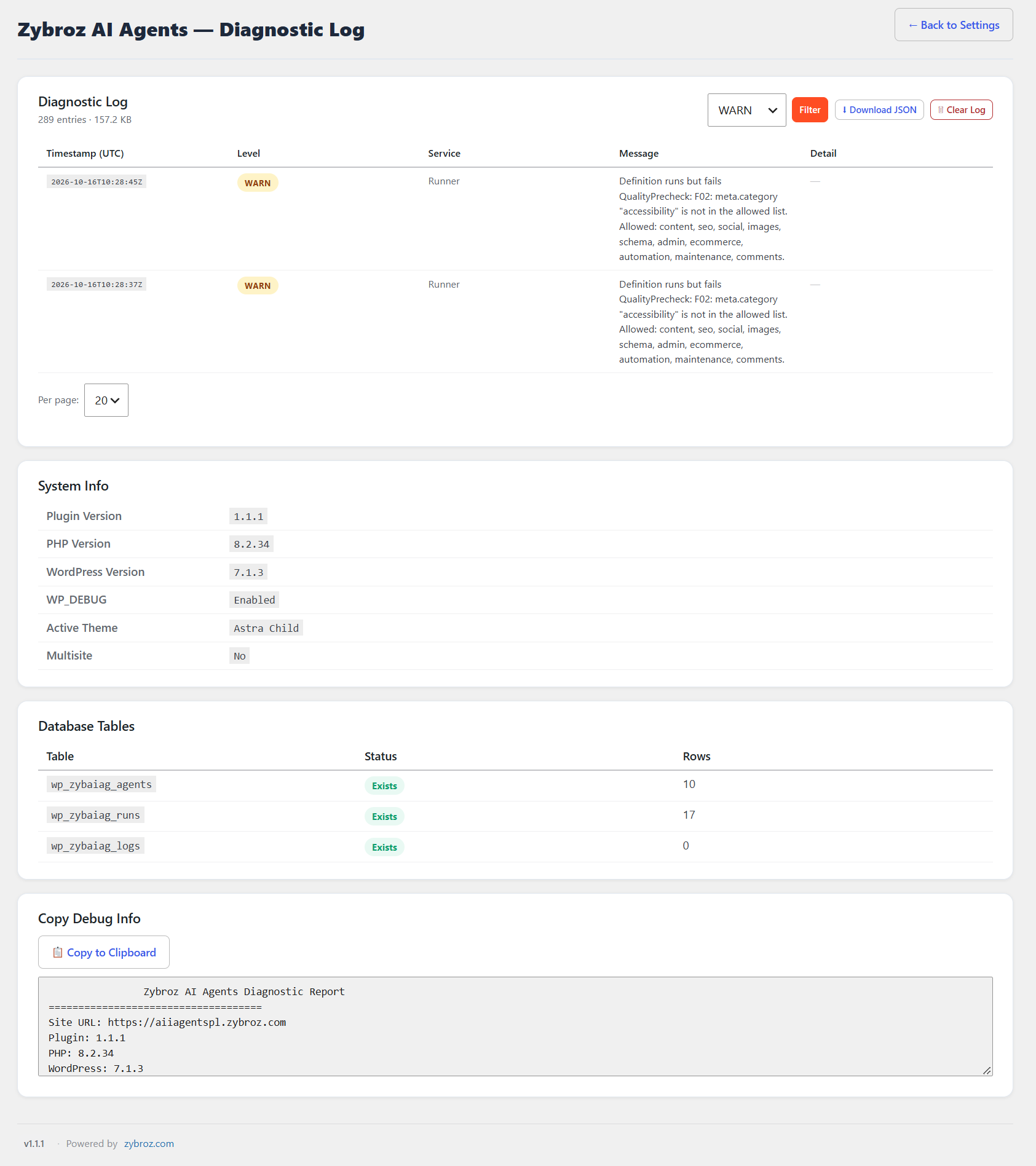
- Fixed: run-failure/retry messages pointed users at WordPress core’s debug.log or Site Health, which never had the relevant detail — they now point at the plugin’s own Diagnostic Log (Settings > Debug Log); an uncaught exception during a run’s execution is now also written there instead of only showing in the transcript.
- Fixed: the Runner Console’s target picker stayed visible for site-wide agents that don’t take a target, showing a dead search field instead of “No target required – click Run”; a step’s findings list could also render after a later step’s line, or above its own step’s still-typing line, instead of directly under it.
- Fixed: run-mode confirmation dialogs (Console and REST) showed raw mode slugs like “semi-auto” instead of the user-facing label (Test/Smart/Autonomous); Classic Runner’s post-ID picker dropdown stayed open after clicking elsewhere and rendered behind other buttons due to a stale z-index.
- Fixed: a rejected OpenRouter key’s failure message could scroll out of view the moment focus jumped to the key field — it now also shows inline next to the field; saving a key now immediately runs the real verification check instead of always showing “Active” with no validation.
- Fixed: Database Backups “Prune Now” silently did nothing when the “Keep for (days)” / “Keep max (count)” fields were edited but not yet saved — it now reads the live field values directly.
- Fixed: pressing Enter on a numeric Post ID in the Runner Console’s target field picked the target using the raw “#123” as its label forever instead of looking up the real title — Enter now resolves it the same way the search dropdown already does, with a brief “Looking up #123…” placeholder.
- Fixed: picking a new Default AI Provider and clicking “Save Settings” could silently fail to apply with no indication anything was wrong — the Settings page now actually shows that warning.
- Fixed: the agent name in the Runner Console’s title bar rendered invisible (dark text on the dark panel); the “Run on multiple” scope popup had no outside-click dismissal; the final report could visibly appear before an earlier step’s text had finished its on-screen typing animation.
- Fixed: the post ID / title search dropdown never closed when clicking elsewhere and could render underneath other console elements; it also showed nothing while the lookup was in flight — now shows a “Searching…” placeholder.
- Fixed: the Runner Console’s “Copy transcript” / “Download transcript” export squashed the final report bubble’s label, agent name, and outcome text together with no spacing; the button always said “Copy transcript” even where the browser’s Clipboard API isn’t available (needs https or localhost) — it now shows “Download transcript” up front with a tooltip explaining why, in that case.
- Fixed: the Runner Console’s mode-selector dropdown (Test/Smart/Autonomous) rendered with a light background inside the Console’s dark theme, since it was appended outside the Console’s own themed container.
- Fixed: Site Health Reporter’s drift report computed plugins reactivated since the last snapshot but never showed the count — added a “Plugins Activated” report row and folded the count into the summary line.
- Changed: Runner Console header now reads “AI Agent for {agent name}” and “Agentic AI Console V 1.1.8” instead of the generic “{agent} — Runner” / “AI Agent Runner Console”; added a short clarifying note on the WordPress Core AI Client card explaining it uses its own WordPress-managed credentials, separate from this plugin’s own Anthropic/OpenAI/Google keys.
- Changed: the Post ID field and the title-search field are now one combined field (“Search by title or Post ID…”) instead of two separate inputs; action/Run buttons in the Runner Console now always use the plugin’s own brand color instead of tracking the site’s WordPress admin color scheme; the Runner Console’s outer area is light again, with the console panel itself staying dark and a clear white border separating the two.
- Security: a failed restore statement’s diagnostic-log entry could include real row data (post content, user emails) via the raw SQL statement and MySQL’s error text; the log entry now records only the statement type, table name, and error code.
1.1.2
Agent reliability fixes: Site Health Reporter and the Core AI Client provider.
- Fixed: the Site Health Reporter agent could abort its entire report when it couldn’t capture WordPress admin notices outside a real wp-admin page load — which is every normal run through the Runner. It now degrades gracefully (skips that section) instead of failing the whole run.
- Fixed: the Site Health Reporter’s “Version Changes” report section still showed the retired “Stealth Plugin Updates” label even though the wording had already been neutralized everywhere else.
- Fixed: saving “WordPress Core AI Client” as the Default AI Provider always failed with “not enabled and credentialed yet,” even when its connectors were properly configured under Settings Connectors — the check referenced a WordPress core class name that was never correct.
- Hardened: a handful of
$wpdbprepared-statement comments that weren’t actually suppressing the warnings they were written for (code-quality only, no functional change).
1.1.1
Small fixes and cleanup following the Runner Console UI release.
- Fixed: the Runner Console’s mode-selector menu, quick-help popover, and share menu each reimplemented the same viewport-clamping and outside-click-dismiss logic independently; consolidated into one shared implementation to prevent drift between them.
- Fixed: Reset / Run Again could leave stale queued transcript lines from the previous run draining into the new one; the queue is now purged on reset/reopen.
- Fixed: transcript bubbles in the Runner Console used a hardcoded dark background that stayed dark regardless of light/dark mode; now follows the active theme.
- Hidden: the Settings “Runner UI” (Classic/Console) toggle — Console is now the sole Runner UI, and the Classic/Console selector has been retired.
- Note: if dashboard styling still looks stale after updating, a hard refresh clears it — some hosts/CDNs cache assets by version number.
1.1.0
Runner Console UI reaches full parity with the classic run modal, plus clearer failure diagnostics.
- The Runner Console (the newer, non-modal way to run an agent) now matches the classic run experience feature-for-feature: typewriter-style step output, itemized findings, 5-star run rating, rich share menu (branded image + social links) with copy-to-clipboard fallback, transcript copy/download/export, per-step issue flagging with a compiled report, backup-gated rollback, bulk post-type scoping with a live count preview, and light/dark theme parity.
- Fixed: the Alt Text Architect agent no longer burns an AI call and a consent prompt when every image on the page already has alt text (regression from an earlier refactor; now restored).
- Fixed: an approval-needed step now shows the actual AI-generated suggestions being approved (e.g. per-image alt-text suggestions, generated FAQs, meta description candidates) instead of a generic “review and confirm” prompt with nothing to review.
- Fixed: the “Run on multiple” post-type scope popup now closes properly (toggle + explicit cancel) instead of staying open over the command bar.
- Fixed: the mode-selector and the quick-help popover now stay within the visible window instead of occasionally rendering off-screen.
- Fixed: the Post ID field now offers the same live title-search suggestions as the title field, instead of requiring an exact ID typed blind.
- Fixed: the dashboard no longer gets auto-repainted black by some browsers’ OS-driven dark-mode detection.
- Improved: failed runs and apply steps now surface a clearer, more specific error message instead of a generic failure notice.
- Improved: the quick-help popover now covers the console’s main controls (target search, bulk scope, Run, approval gate), not just the Test/Smart mode explainer, and its icon moved next to the close button.
- Several smaller Runner Console fixes: correct target post-type list in target search, share menu now renders in the correct light/dark theme, mode-explainer default text no longer hardcoded, dark-console number-input styling, and a notice now appears when a saved AI provider key fails to decrypt.
- Housekeeping: internal version-tracking cleanup — this release supersedes unpublished internal builds that were briefly labeled 1.0.2–1.0.4 during development; no separate upgrade action is needed from 1.0.1.
1.0.1
Runner mode simplification, privacy disclosure correction, security hardening, and maintenance.
- Renamed the Runner’s run modes for clarity: Manual -> Test (runs each step for real, one at a time, so you can check the result before continuing — not a dry run), Semi-Auto -> Smart (always previews first, then a single Confirm or Cancel).
- Removed the run-history unlock requirement — Test and Smart are both available immediately on every agent, no “earn trust first” gate.
- Fixed: an agent’s “needs a specific post” requirement is now always computed from the agent’s own definition on the server, instead of trusting a button’s client-side guess — closes a bug where running an agent from the Library catalog’s installed-agent Run button could skip the required post picker and fail with “post_id is required.”
- Successfully completing a Test run now automatically marks an agent “Autonomous-ready” (the existing “mark safe” trust flag, renamed) for future automation surfaces.
- Added a way to flag specific steps in a Test run’s transcript and submit a combined report for agents installed from the Community Library.
- Fixed: removed a duplicate Run entry point in the Library catalog that opened a different, incomplete welcome screen — Automation > Agents is now the only Run path.
- Fixed: the issue-flag icon was missing from the consent-gate transcript card, and flagging a step no longer force-scrolls the transcript to the bottom.
- Fixed: a marked-safe agent now goes through the normal welcome screen with an inline “Auto Safe” badge (+ Undo) instead of a separate interstitial screen.
- Fixed: root-caused and removed a duplicate approval prompt that could ask for the same consent/warning gate twice in a single run.
- Fixed: the Alt Text Architect agent no longer burns an AI call and a consent prompt when every image on the page already has alt text — it now short-circuits straight to the report.
- Corrected the Privacy and External Services sections to accurately disclose the automatic daily Hub metrics sync and per-run outcome reporting that occur once a Hub account is connected (previously undisclosed as “automatic”; the behavior itself is unchanged and was already gated on an explicitly connected account).
- Security: hardened AI-prompt templating so a prior step’s AI-generated or externally-fetched output is framed as untrusted data rather than spliced unmarked into the surrounding prompt (prompt-injection hardening).
- Security: validated caller-supplied table names in the database backup module against the live table list before use.
- Fixed a stale uninstall cleanup list that missed several options and one Action Scheduler hook added since v1.0.0.
- Performance: skip the full database-schema existence check on every admin page load once the schema has been verified for the current version.
1.0.0
First stable release of Zybroz AI Agents for WordPress.
Turn your WordPress dashboard into an AI automation platform. Build reusable agents, run multi-step workflows, and automate SEO, content, accessibility, internal linking, and site maintenance—with tools to preview changes, create backups, and roll back supported changes when needed.
Agent creation and management
- Visual Agent Builder with live JSON preview, AI Prompt Generator, and guided Chat-to-Create wizard.
- Reusable agents with versioning, import/export, and support for JSON configurations and plain-text prompt templates.
- Quality Precheck to help validate agents before execution.
AI engines and providers
- Multi-model AI through OpenRouter, with a curated fallback chain that prioritizes available free models.
- Local Ollama support for running compatible models locally.
- Optional direct integrations with Anthropic, OpenAI, Google, and WordPress Core AI Client.
- InbuiltEngine for logic-based WordPress administration and maintenance tasks without requiring an AI API key.
Agents, workflows, and library
- 10 bundled starter agents for accessibility scanning, alt text, meta descriptions, FAQ generation, link health, media auditing, site health, SEO plugin auditing, orphan pages, and outdated content.
- Visual Workflows for connecting agents, actions, and conditions into multi-step automations.
- Community Library integration with the Zybroz Hub to browse, install, and publish agents, with features such as ratings, favorites, and update notifications.
- AI Action Library for reusable capabilities.
- WooCommerce product-description support.
Monitoring and productivity
- Run History and Metrics for tracking agent execution.
- Dashboard for accessing agent activity and tools.
- Advanced Backup Module and supported rollback functionality.
- Achievements and share-card images.
Safety, security, and privacy
- Dry-run previews and automatic post snapshots for supported write operations, with rollback support.
- Consent gates for write-capable steps, requiring approval before execution in Manual, Semi-Auto, and Auto modes.
- Encrypted API-key storage, with keys protected from browser-side exposure.
- SSRF protections for outbound requests to the Zybroz Hub, OpenRouter, and supported AI providers.
Includes a one-time automatic migration of internal database tables and identifiers to the zybaiag_ / zybroz- naming conventions. See the Upgrade Notice before upgrading.
0.9.392
Major update consolidating all development since 0.9.391 into one WordPress.org release.
- Migration: the original direct Anthropic/OpenAI/Gemini key fields (from 0.9.391 and earlier) are retired in favor of OpenRouter as the default external AI path. If this site has one of those original keys stored, a one-time “Migrate your AI provider keys” screen shows it once — read-only, copy-friendly, never transmitted anywhere — with instructions to move it to OpenRouter, then removes it from storage once you finish or skip. InbuiltEngine (non-AI) actions are unaffected and need no key.
- Security: write-capable agent steps that require human consent now actually halt in every run mode (Manual, Semi-Auto, and Auto) until a person approves — previously only Manual mode paused correctly. Each approval is bound to the exact run, step, and content shown, is time-limited and one-time-use, and every crossing is recorded in a new audit log.
- New: Workflows — build multi-step automations chaining agents, actions, and conditions, with a visual builder and run history. (0.9.391 shipped a “Coming soon” placeholder for this; it is now fully built.)
- New: Community Library — browse, install, and publish agents to/from the Zybroz Hub, including ratings, favorites, and update notifications for Hub-sourced items.
- New: a separate, newly-added “More AI Providers” panel lets you optionally configure a fresh direct key for Anthropic, OpenAI, Google, or WordPress’s own Core AI Client, as an alternative to routing through OpenRouter. This is a different, explicitly opt-in feature from the retired keys above — OpenRouter remains the default external AI path, and nothing is sent to these providers unless you configure a key for them here.
- Dozens of reliability, pagination, dark-mode, i18n, and security-hardening fixes across Settings, Library, Dashboard, Run History, and the AI Action library.
0.9.391
- New: Settings now has a collapsible “Data & Privacy” panel that restates, in plain language, what the plugin sends to AI providers and to the optional Central Library, and when — a summary of the “External Services” section of this readme.
- Change: The Workflows section now shows a “Coming soon” placeholder. Multi-step workflows are still in development; the menu entry, stored workflow data and REST routes are unchanged and nothing is lost. Run agents individually from the Agents page in the meantime.
- Housekeeping: Version bump on top of 0.9.390 with no database or option-schema changes — upgrading from 0.9.390 is a no-op migration.
0.9.390
- Added: Initial WordPress.org release — approved baseline v0.9.390