

Description
For growing digital businesses tired of the clutter of their own data, Shahin is the watchtower and decision engine that turns analytics, SEO and behavior into one decision-ready clarity. With Shahin, your platform has no blind spots.
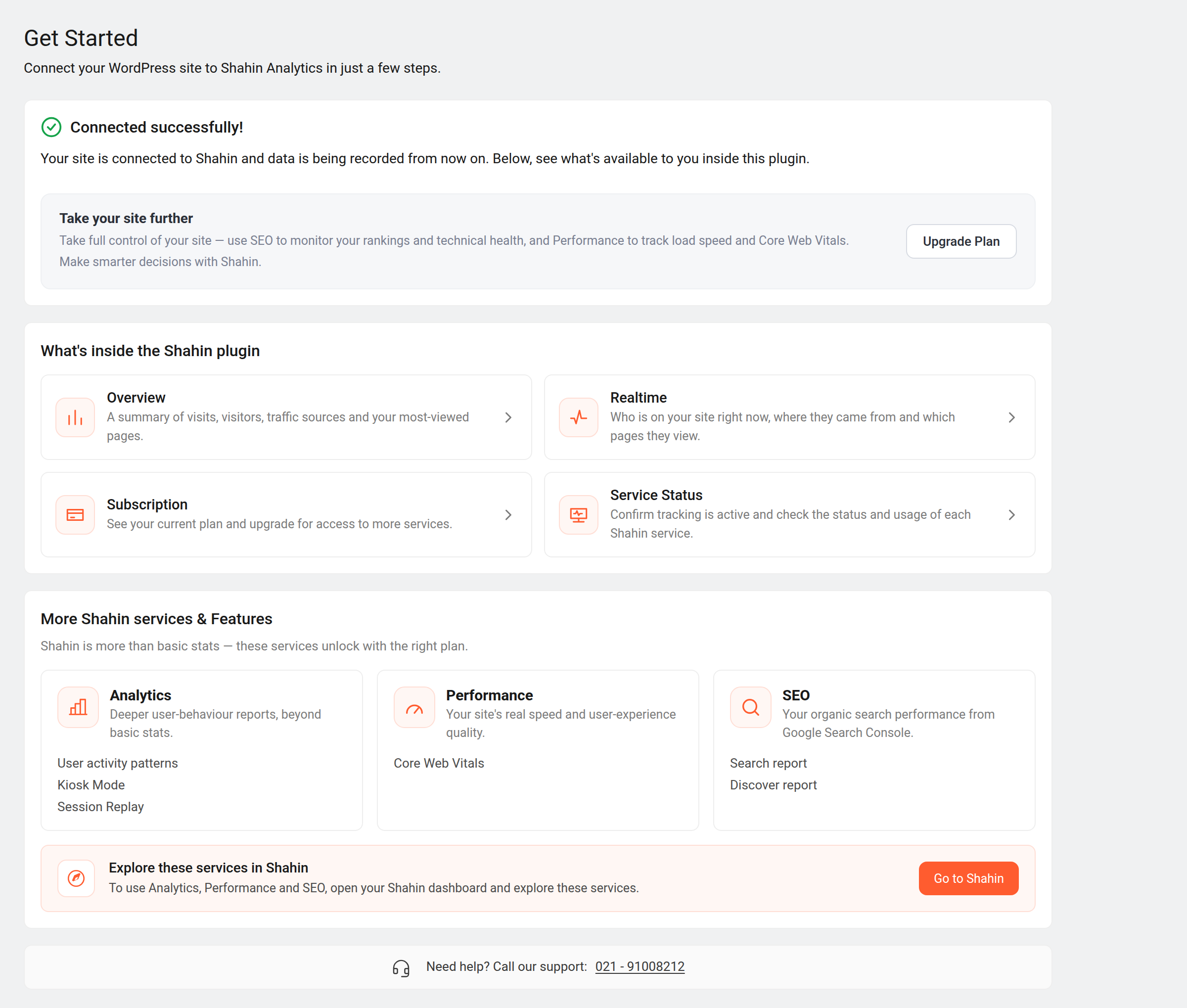
What you get inside this plugin
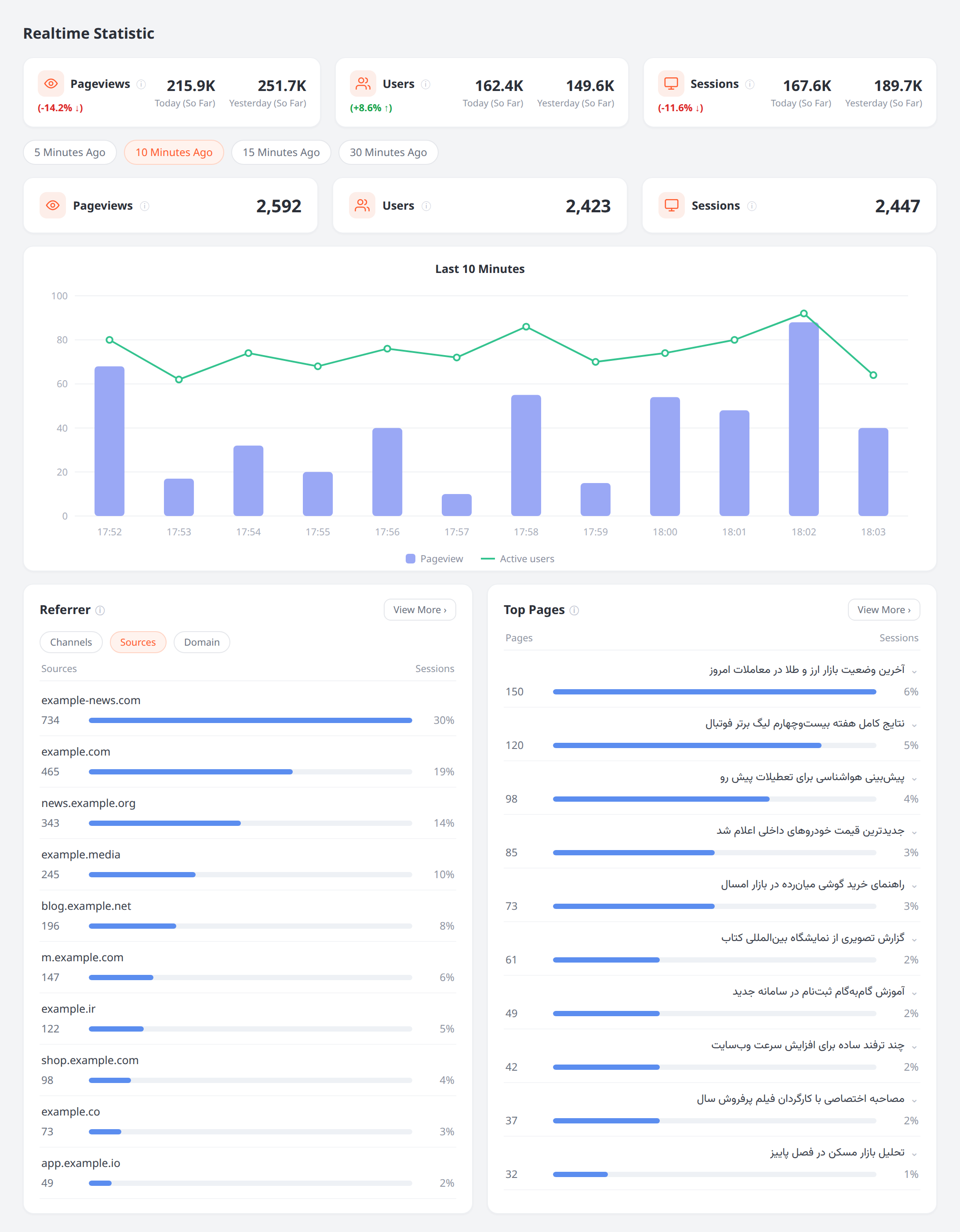
- Realtime — see who is on your site right now, where they came from, and which pages they view.
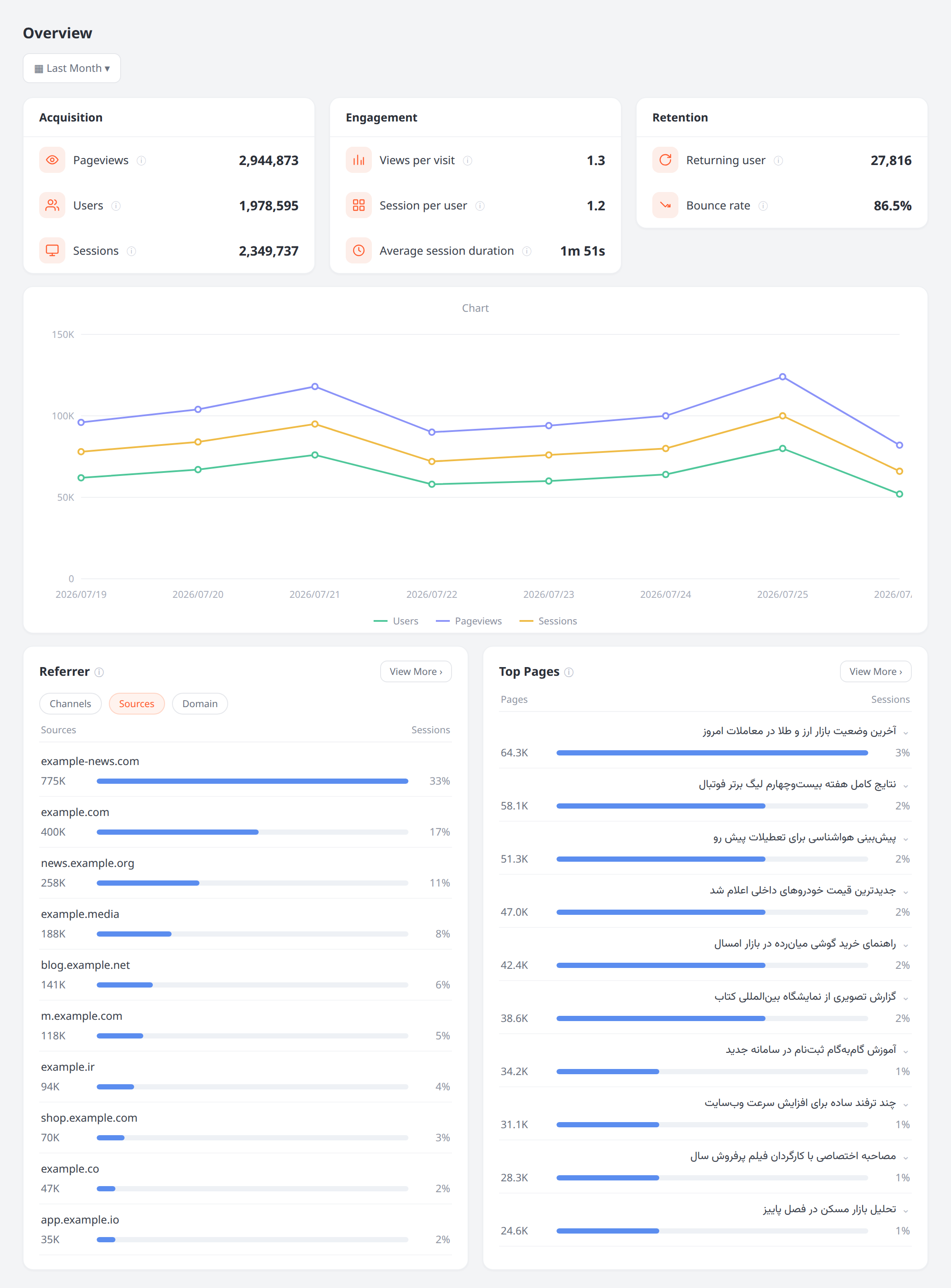
- Overview — visits, visitors, traffic sources, top pages, engagement and retention, all in one place.
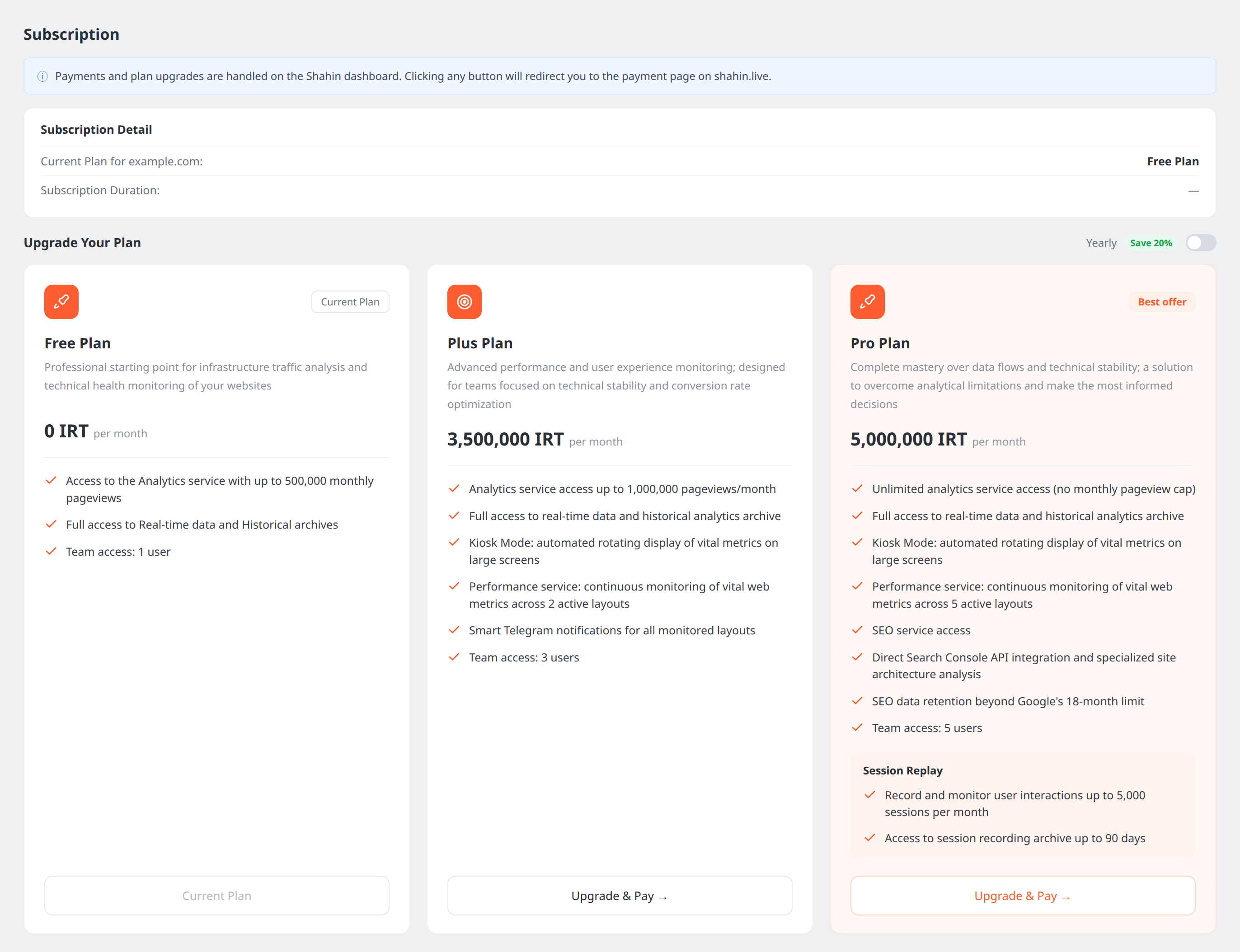
- Subscription and Services & Usage — your current plan, and which Shahin services are active for your site.
The plugin injects the Shahin tracking script into the <head> of your public pages, and serves a domain-ownership verification file at /.well-known/shahin-verification.txt.
More insight, inside Shahin
An integrated suite of analytics services for monitoring performance, understanding user behavior, and making precise, data-driven decisions.
- SEO — organic search performance from Google Search Console: Search and Discover reports, kept beyond Google’s 18-month limit. See which stage of its lifecycle each piece of content is in, and which pages need your attention first.
- Performance — real load speed and Core Web Vitals, monitored continuously.
- Session Replay, Kiosk Mode, User Activity Pattern and User Journey — go deeper as you grow.
Why Shahin
Real-time speed. We prioritize fast, immediate access to your data. Reports are processed and displayed the moment they happen, so you can monitor live and react to sudden shifts as they occur.
Resilient infrastructure, operational stability. A commitment to flawless performance at any traffic level means your data is reliable and available at every moment. That stability is the foundation of your trust in the analysis.
Less cognitive load, more strategic focus. We turn raw data into organized, actionable information — sharpening your decision-making with minimal wasted time, and pointing you straight at what matters.
Your data stays server-side
All analytics requests are made server-side by PHP using your credentials; your private token is stored in the database, masked in the UI, and is never sent to the browser or exposed in page source. The in-page dashboards talk only to WordPress (admin-ajax); WordPress talks to Shahin.
Need help? Open a Shahin support ticket.
External services
This plugin connects your site to the Shahin analytics service to provide its features. It contacts:
- Shahin API —
https://my.shahin.live— server-to-server requests (from your WordPress server, authenticated with your project tokens) to retrieve analytics, subscription, and service-status data shown in wp-admin. Sent: your project tokens and the date ranges/windows you view. Terms of Service · Privacy Policy. - Shahin script provider —
https://sp.shahin.live— the plugin fetches your tracking loader snippet (identified by your public token) and injects it on public pages. That script then measures visits and sends analytics to the Shahin service from visitors’ browsers.
The plugin also renders ordinary links you can click that lead to the Shahin websites: https://shahin.live (product/marketing pages) and https://my.shahin.live (your Shahin dashboard, e.g. billing and project settings). Following those links is always a user action; the plugin never contacts them automatically.
No data is sent until you connect your project by entering your tokens. No fonts, scripts, or styles are loaded from third-party CDNs — every asset ships inside the plugin.
Third-party libraries
All third-party assets are bundled locally under assets/admin/vendor/ — nothing is loaded from a CDN at runtime. Each is a byte-identical, unmodified distribution file of a public npm package, so the source is publicly auditable at the exact upstream path named below:
- Apache ECharts 6.1.0 (https://echarts.apache.org — Apache-2.0):
vendor/echarts.min.js, the unmodifieddist/echarts.min.jsfrom theechartsnpm package. - persian-datepicker 1.2.0 + persian-date 1.1.0 (MIT):
vendor/persian-datepicker/, the unmodified dist files from thepersian-datepickerandpersian-datenpm packages — the dual Jalali/Gregorian calendar for the custom date-range dialog. - Phosphor Icons (https://phosphoricons.com — MIT):
vendor/phosphor/, individual regular-weight SVGs copied from the@phosphor-icons/corenpm package. - Roboto (SIL Open Font License 1.1):
vendor/roboto/, latin woff2 subsets (400/500/700) from the@fontsource/robotonpm package, served locally.
Screenshots

Installation
- Install and activate the plugin.
- In your Shahin dashboard, open your project’s settings and copy the public token (12 characters) and private token (32 characters). If you don’t have a project yet, create one at shahin.live.
- In wp-admin, open Shahin WP Get Started and paste both tokens, then connect.
- Once connected, the tracking script is injected automatically and the Overview / Realtime pages show your data.
Requirements: WordPress 6.0+ and PHP 8.0+.
FAQ
-
Where do I get my tokens?
-
From your project settings in the Shahin dashboard (the “API Key” section). The public token identifies your site; the private token is a secret used only server-side.
-
Is my private token exposed to visitors or in the browser?
-
No. It is stored server-side, shown masked in wp-admin, and never printed to HTML or JavaScript. Only your site’s public token appears in the injected tracking snippet, by design.
-
Does this plugin send data to an external service?
-
Yes — see “External services” below. Connecting your site to a hosted analytics service is the plugin’s purpose.
-
Can I point the plugin at a self-hosted or staging Shahin instance?
-
Yes. Define
SHAHIN_WP_PLUGIN_API_BASE_URLandSHAHIN_WP_PLUGIN_SCRIPT_BASE_URLinwp-config.php, or use theshahin_wp_api_base_url/shahin_wp_script_base_urlfilters. -
Where do I get support?
-
Use the support forum here on WordPress.org, or open a ticket in your Shahin dashboard.
Reviews
There are no reviews for this plugin.
Contributors & Developers
“Shahin Analytics” is open source software. The following people have contributed to this plugin.
Contributors
Translate “Shahin Analytics” into your language.
Interested in development?
Browse the code, check out the SVN repository, or subscribe to the development log by RSS.
Changelog
1.0.3
- The “Service Status” page is now called Services & Usage (menu, page title and the Get Started card). Its URL is unchanged, so existing bookmarks keep working.
- The Shahin service cards on Get Started now show an arrow in the corner, making it obvious they open the Shahin dashboard in a new tab.
1.0.2
- Icon SVG output is now escaped with
wp_kses()at the point of output in every admin template.
1.0.1
- Tracking snippet is now printed through
wp_print_inline_script_tag()with strict parsing (fails closed on any unexpected shape). - Upgraded bundled Apache ECharts to 6.1.0.
- Translations now load on the
inithook.
1.0.0
- Initial public release.
- Connect via public/private project tokens (server-side, private token never exposed to the browser).
- Overview and Realtime analytics pages with interval refresh.
- Subscription and Service Status pages.
- Tracking-script injection on public pages and
/.well-knowndomain verification. - Persian (fa_IR) translation.