Description
D613 Pay lets your WooCommerce store accept Zelle, Venmo, PayPal and Cash App — the peer-to-peer apps your customers already use — with no per-transaction processor fees. It adds four checkout methods in a single plugin.
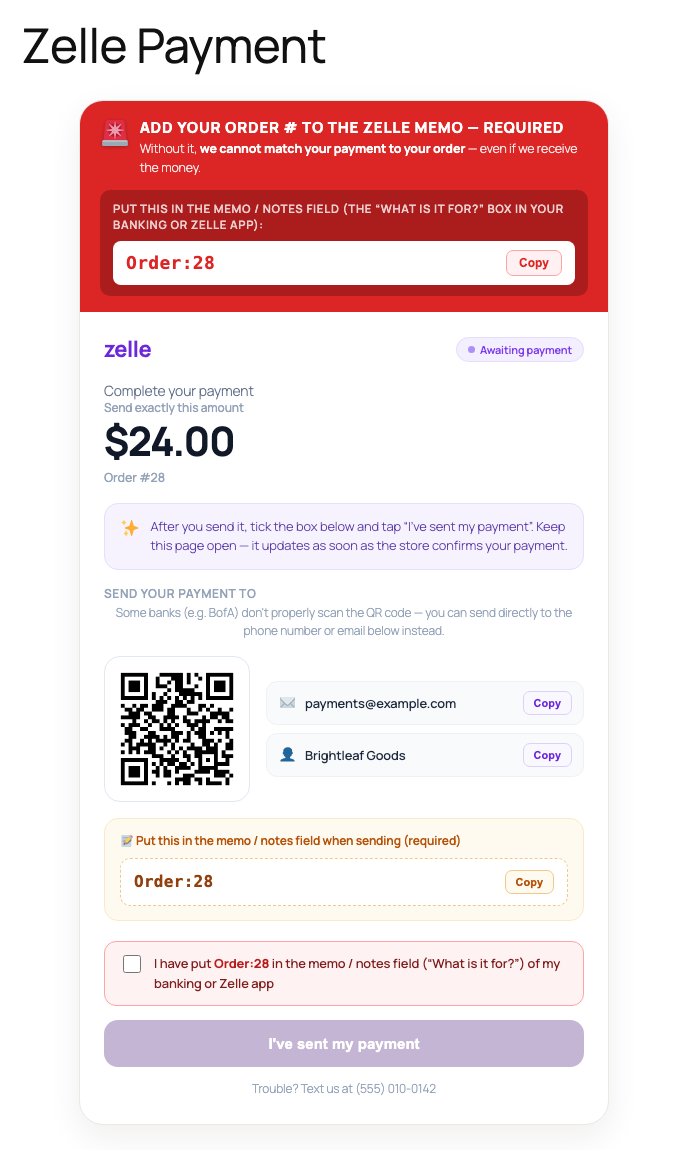
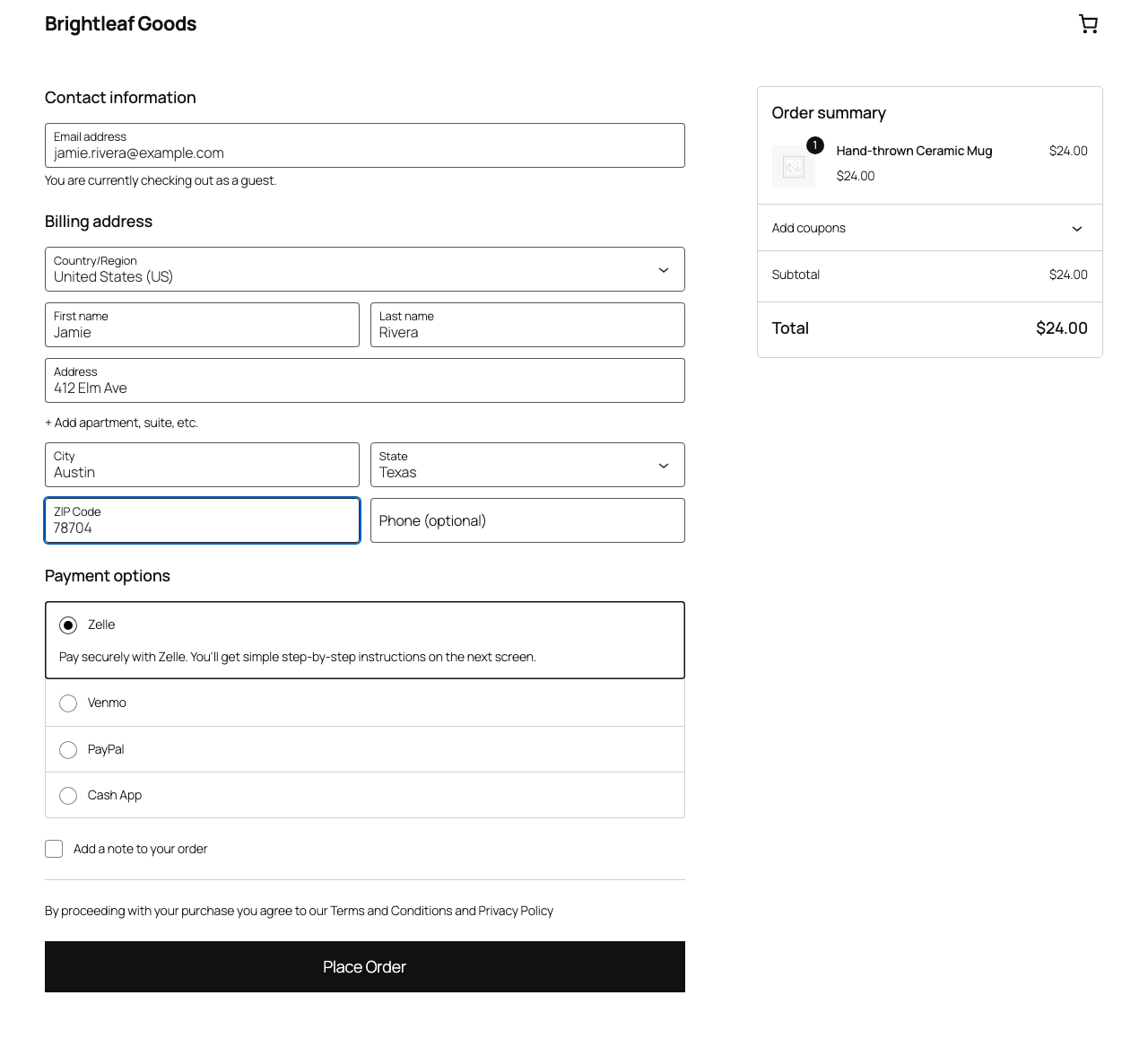
When a customer picks one of these methods at checkout, D613 Pay sends them to a clean, branded pay page that shows exactly where to send the money (your handle / email / phone / $Cashtag, plus an optional QR code) and the order number to put in the payment memo. The order is held as Pending Confirmation — stock is reserved — until you verify the payment and mark it Processing.
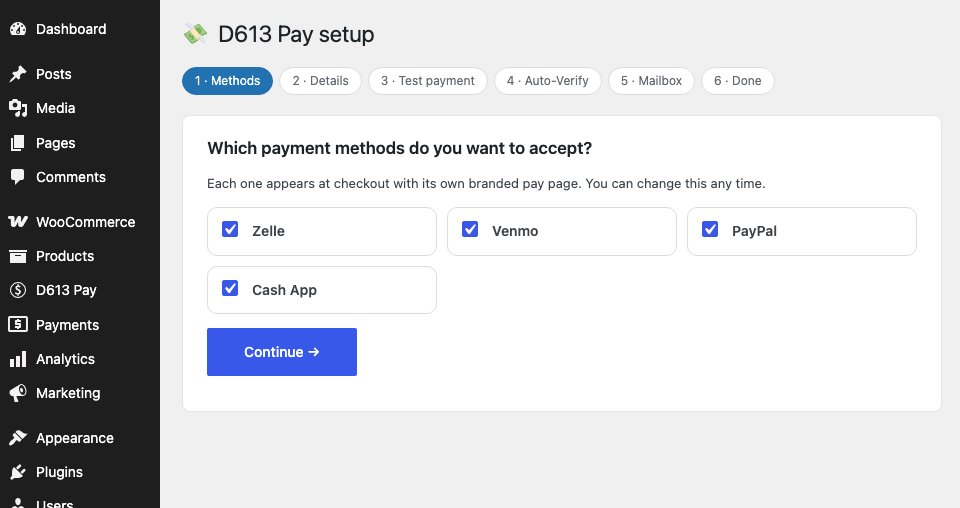
A guided setup wizard walks you through choosing your rails, then sets up each one in turn: its details and, with Auto-Verify, a $1 test payment and the inbox its payment alerts arrive in. It opens with the one tip that makes setup painless: use the same email address on all your payment accounts, so every alert lands in one inbox.
What you get, free
- Zelle, Venmo, PayPal and Cash App as WooCommerce payment methods
- A branded pay page per rail with your handle/email/phone, an optional QR code, and the order memo
- A “Pending Confirmation” order status that holds stock until you confirm
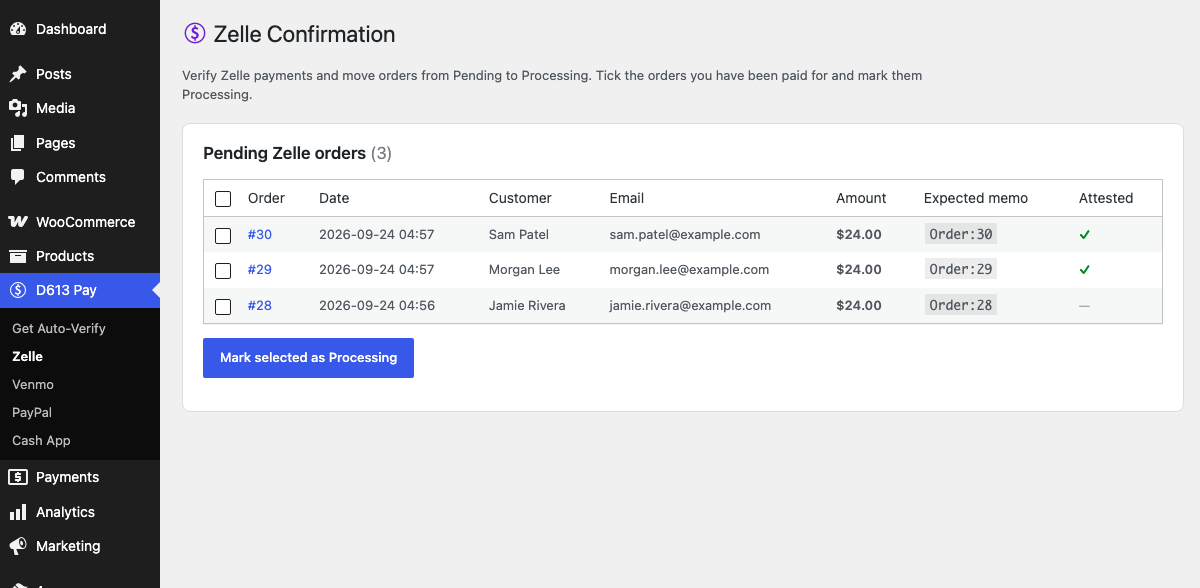
- A per-rail confirmation dashboard: see pending orders, tick the ones you’ve been paid for, and mark them Processing (the customer is emailed automatically)
- A re-runnable setup wizard
Optional upgrade: Auto-Verify
Confirming each payment by hand gets old fast. D613 Pay Auto-Verify is a separate paid add-on that reads the payment-alert emails your bank / Venmo / PayPal / Cash App already send you and confirms each matching order automatically, 24/7 — including split and partial payments, with a needs-review queue for anything it isn’t sure about. Auto-Verify is a subscription service (14-day free trial); the free plugin above is fully functional on its own and never expires.
Requirements
- WooCommerce 7.0 or newer
- Pretty permalinks (WooCommerce needs these anyway)
External services
The free plugin does not require any external service. It contacts one service, only if you opt in:
Anonymous install statistics (opt-in)
- What it is: a small ping to D613 Labs so we can count active installs.
- When it runs: never, unless you click “Allow” on the one-time notice after activation. If you click “No thanks”, nothing is ever sent. When allowed, a request is sent once on opt-in and then weekly.
- What is sent: a one-way hash of your site URL (not the URL itself), the plugin version, and which payment rails are enabled. No personal data, no customer data, no order data.
- Where:
https://paycloud.d613labs.com/v1/telemetry/ping, operated by D613 Labs. - Terms and privacy: Terms of Service · Privacy Policy
Links to our website
The plugin links to https://d613pay.d613labs.com when you choose to learn about or purchase the optional Auto-Verify add-on. Following a link sends nothing from your store. Auto-Verify itself is a separate plugin with its own disclosure.
Screenshots
Installation
- Install and activate WooCommerce.
- Upload the plugin through Plugins Add New Upload Plugin, or install it from the WordPress.org directory, then activate it.
- You’ll be offered the D613 Pay setup wizard — it walks you through picking your rails, then each rail in turn. You can re-run it any time from the D613 Pay menu.
- Alternatively, configure each method manually under WooCommerce Settings Payments.
FAQ
-
Does this charge the customer’s card?
-
No. These are peer-to-peer transfers (Zelle, Venmo, PayPal, Cash App). The customer sends the money from their own app, and you confirm receipt. There is no card processing and no per-transaction processor fee from this plugin.
-
How do I know a customer actually paid?
-
You check your bank / app notification and then tick the order on the D613 Pay confirmation screen to mark it Processing. If you’d rather that happen automatically, the paid Auto-Verify add-on reads your payment-alert emails and confirms matching orders for you.
-
Is the free version crippled?
-
No. All four payment methods, the branded pay pages, the pending-confirmation flow, and the confirmation dashboard work fully and forever without paying anything. Auto-Verify only adds automatic confirmation.
-
Does the plugin send my data anywhere?
-
No — the free plugin works entirely on your own site and makes no requests to any outside service in the course of taking or confirming payments. The only exception is optional, opt-in install statistics, which are off until you explicitly allow them; see “External services” below. It links out to our website only when you choose to look at the paid add-on.
Reviews
There are no reviews for this plugin.
Contributors & Developers
“D613 Pay – Zelle, Venmo, PayPal & Cash App Payments for WooCommerce” is open source software. The following people have contributed to this plugin.
Contributors
Translate “D613 Pay – Zelle, Venmo, PayPal & Cash App Payments for WooCommerce” into your language.
Interested in development?
Browse the code, check out the SVN repository, or subscribe to the development log by RSS.
Changelog
0.5.7
- Setup wizard: the Auto-Verify step now explains what Auto-Verify does, has a “Get Auto-Verify” button that opens the sign-up page in a new tab, and always shows the license-key box. A key entered before the Auto-Verify add-on is installed is kept and used automatically once the add-on is activated.
- On the free plan the wizard only asks for each method’s payment details; the test payment and inbox steps appear only with Auto-Verify.
0.5.6
- Setup wizard: Gmail inboxes can connect with “Sign in with Google” (with Auto-Verify), no app password needed.
0.5.5
- Setup wizard: Outlook.com, Hotmail and Microsoft 365 inboxes connect with “Sign in with Microsoft” (with Auto-Verify). No app password needed, and Microsoft 365 shared mailboxes are supported.
0.5.4
- With Auto-Verify connected, payment memos use your store’s own code (for example KXQD-1042) so payments stay attributable even when several stores share one bank account. Stores without Auto-Verify keep Order:1042.
- Setup wizard reorganised: after picking your payment methods you set up each one start to finish (details, a $1 test payment, the inbox its alerts arrive in, turn on Auto-Verify) instead of doing every method at every step.
- The wizard now opens with setup advice: use one email address for all your payment accounts, choose an inbox you can get IMAP sign-in details for (an address on your own domain, or a Gmail with an app password), and check payment emails are switched on.
- Each payment method can use its own inbox. The inbox connected for one method is offered for the next with no password needed, or you can connect a different one.
- The wizard script is versioned by file time, so an update is never served from the browser cache.
0.5.3
- New name: D613 Pay – Zelle, Venmo, PayPal & Cash App Payments for WooCommerce.
- Pay and confirmation pages no longer promise automatic payment detection unless the optional Auto-Verify service is connected; without it they tell the customer the store will confirm the payment.
- Setup wizard (Auto-Verify step): choose payment methods (Zelle from any bank, Venmo, PayPal, Cash App) instead of individual banks, and no longer scans the whole mailbox after connecting.
0.5.2
- Removed a leftover, non-functional “AI payment matcher” panel from the confirmation dashboards. It pointed at a local service that only existed on the original development server and never worked on other sites; confirmation is manual in the free plugin.
- All page styles and scripts are now enqueued from asset files instead of printed inline.
- Hardened request handling on the pay-page submit (nonce sanitization).
- Declares WooCommerce as a required plugin (WordPress 6.5+ dependency header).
0.5.0
- Rebrand to D613 Pay: payment method IDs, classes, assets and menus unified under the D613 Pay name. Existing gateway settings are migrated automatically on upgrade.
- The four confirmation pages now sit under a single “D613 Pay” admin menu.
- Manual confirmation now shows a clear success banner and refreshes the list.
- Fixed a script error on the Cash App confirmation page.